Every page is served on port 8086 by every node, and needs no configuration.
| Page | What it is |
|---|---|
/ | This node: its models, backends, GPUs and activity |
/mesh | The whole cluster, served identically by every node |
/chat | A lightweight chat UI |
/prompt | One request's prompt and output, full page |
Node dashboard
http://<machine>:8086/, for that node:
- One table per model — engine, busy slots and queue — with a row per backend: GPUs, status and phase, busy slots, RSS, GPU utilisation, VRAM, decode progress and respawns
- A fleet line: members alive, mesh models, fleet power and cost
- Live in-flight request timers and the activity log (newest first)
- Host memory graph, live GPU utilisation and VRAM graphs (1 hour history, SSE updates), power consumption and electricity cost
Chat
/chat is a lightweight chat UI for quick model interaction. It is addressable
— /chat?model=<id> preselects a model and &host=<node> pins it to one machine
— and /mesh links into it with one Open Chat entry per model. Aliases are
listed after the real models.
The backend selector lists every machine currently serving the chosen model.
mesh (the default) routes as always, and each reply names the node that ran it
and the node that forwarded it there.
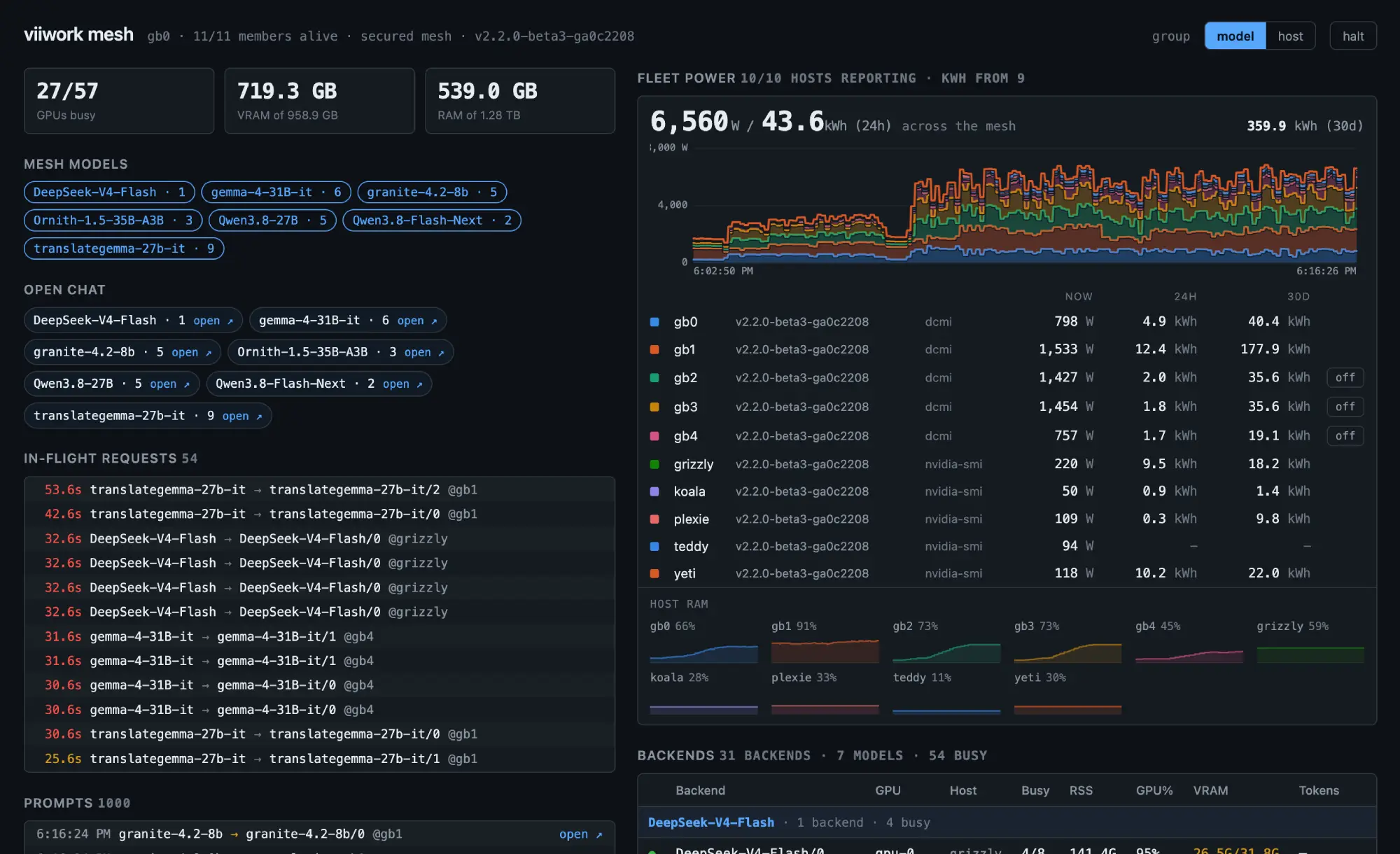
Mesh dashboard
http://<any-machine>:8086/mesh — the same view from every node, so any
machine you can reach shows you the whole mesh.
- Mesh Models — every model across the cluster; click one to filter the view
- Aliases — every alias with its target, fallbacks, what it resolves to now
and its state;
shadowedandunavailableare highlighted - In-Flight Requests — live jobs with elapsed time, task tag, model, and the backend and host serving them
- Prompts — the most recent requests across the mesh, newest first. Every row links to a full-page view of that request's prompt and output; see Prompt and output history
- Fleet totals — GPUs busy, VRAM and host RAM across the whole mesh, as three plain readings at the top of the page
- Fleet Power — live wattage and the last 24 hours' energy for the whole mesh
(
1,751 W / 12.4 kWh (24h)), with the 30-day total at the far right, then all three per host. The kWh half needs the energy store enabled; see power-and-energy.md - Host RAM — a strip of small per-host sparklines under the power panel, each
scaled 0 to that host's total so the height reads as memory pressure. Hover a
frame for the absolute figures. Figures are approximate to about 1 GB — they
are coarsened before being pushed so a value that moves every second cannot
flood the live stream.
/v1/clustercarries the exact numbers. - Backends — backend id, GPUs, host, busy slots, RSS, GPU%, VRAM and decode progress for every machine, grouped by model or by host. Grouped by host, each host header also carries that host's wattage. Members that are not alive stay listed, greyed, with their state.
Hosts are listed by name throughout — the power rows, the stacked bands and the RAM strip all read node-a, node-b, node-c… rather than reordering themselves as load shifts, and a host keeps its colour from first sight.
How it stays live
The page opens a single stream and never polls. Your browser only ever talks to the node you opened; that node reaches the other members itself, so they do not need to be reachable from wherever you are viewing.
Other members' jobs appear in real time. Their backend counts and GPU load
refresh every 5 seconds, from each member's /v1/status.
In-flight requests are reconstructed by your browser from the event stream, because no endpoint returns "what is running now". The stream replays the last 30 seconds when it connects, plus every request still running however old, so opening the page mid-flight shows the jobs already running, and a laptop coming back from sleep gets the completions it missed instead of leaving rows counting up in red forever. A gap longer than the node's event ring is not recoverable: the view then shows fewer requests than are really running rather than phantom ones, and the Backends table's in-flight counts stay correct either way.
Halt (the button in the header, or press h) freezes the whole view so rows
stop moving while you read or click them. Events that arrive during a halt are
queued, not dropped, and applied in order when you resume — the button shows how
many are waiting.
Prompt and output history
Each node keeps the prompt and the response of its last 1000 requests in memory, evicted oldest-first. Nothing is written to disk and nothing survives a restart — this is a debugging aid, not an audit log. Prompt and output are each truncated at 50 000 characters.
The /prompt page's header shows the request's wall time and, when the node
saw a token count, the reply's size and average rate: 296 tokens · 57.5 tok/s.
The rate is generation alone, from the first token to the end. For a plain
(non-streamed) reply, or a request another node executed, the node saw no
first token; the rate is then over the whole request, prompt reading included,
and says so.
The depth is configurable:
activity:
  prompt_history: 1000   # default
Memory scales with it — roughly the count times up to 100 KB, since a prompt and an output are each capped at 50 000 characters. 1000 is therefore about 100 MB of worst-case headroom, and realistically far less. A value below 1 falls back to the default rather than producing a store that drops everything.
Nodes report their own capacity on /v1/status and /v1/cluster, and the mesh
dashboard sizes its list from the largest value any node reports rather than
keeping a second copy of the number. Raise the config and the view follows.
Clicking a row opens /prompt, a full page showing both, with the elapsed time
and a copy button for each. Rows are ordinary links, so cmd-click, middle-click
and open in new tab all work — the intended workflow is fanning a batch of
requests out into background tabs and reading them side by side. Each tab is
titled with its request id so they stay tellable apart.
A reasoning model's thinking is kept and labelled rather than folded into the
answer: with thinking enabled the model leaves content empty and puts
everything in reasoning_content, so discarding it would blank the output for
exactly the requests most worth reading. See
thinking-models.md. A failed request stores its error body,
which is usually the most useful thing on the page.
Neither prompt nor output text is carried on the activity stream; both are fetched only when you open a request, so bodies stay off the per-request path. The response is captured by teeing the bytes on their way to the client and parsing once at the end, so nothing is decoded per token.
Coverage includes local, forwarded and pipeline requests. The history lives on
the node that received the request from the client — a forward leaves none on
the executing node. An aliased request records <model> (alias <alias>). A
request with no recoverable user text (for example multimodal content parts)
still gets an entry if it produced output; a request with neither gets none
rather than a blank one.
Two endpoints back this: /v1/prompts?rid=N reads this node's own store, and
/v1/mesh/prompt?rid=N&addr=HOST:PORT is what the dashboard calls. Request ids
are a per-process counter rather than a cluster-wide namespace, so a lookup is
only meaningful against the node that minted the id, and the fan-out happens
server-side for the same reason the rest of the mesh view does. An empty addr
means "this node", and a non-empty one is forwarded only to the API address
of an alive mesh member — see security.md.